 NA-MIC Project Weeks
Back to Projects List
Slicey - an AI coding agent built into 3D Slicer
Key Investigators
- Andras Lasso (Queen's University, Canada)
- Ron Kikinis (Brigham and Women's Hospital, USA)
- Andrey Fedorov (Brigham and Women's Hospital, USA)
- Sam Horvath (Kitware, USA)
Github Repository
Funding Source(s)
(to be added)
Project Description
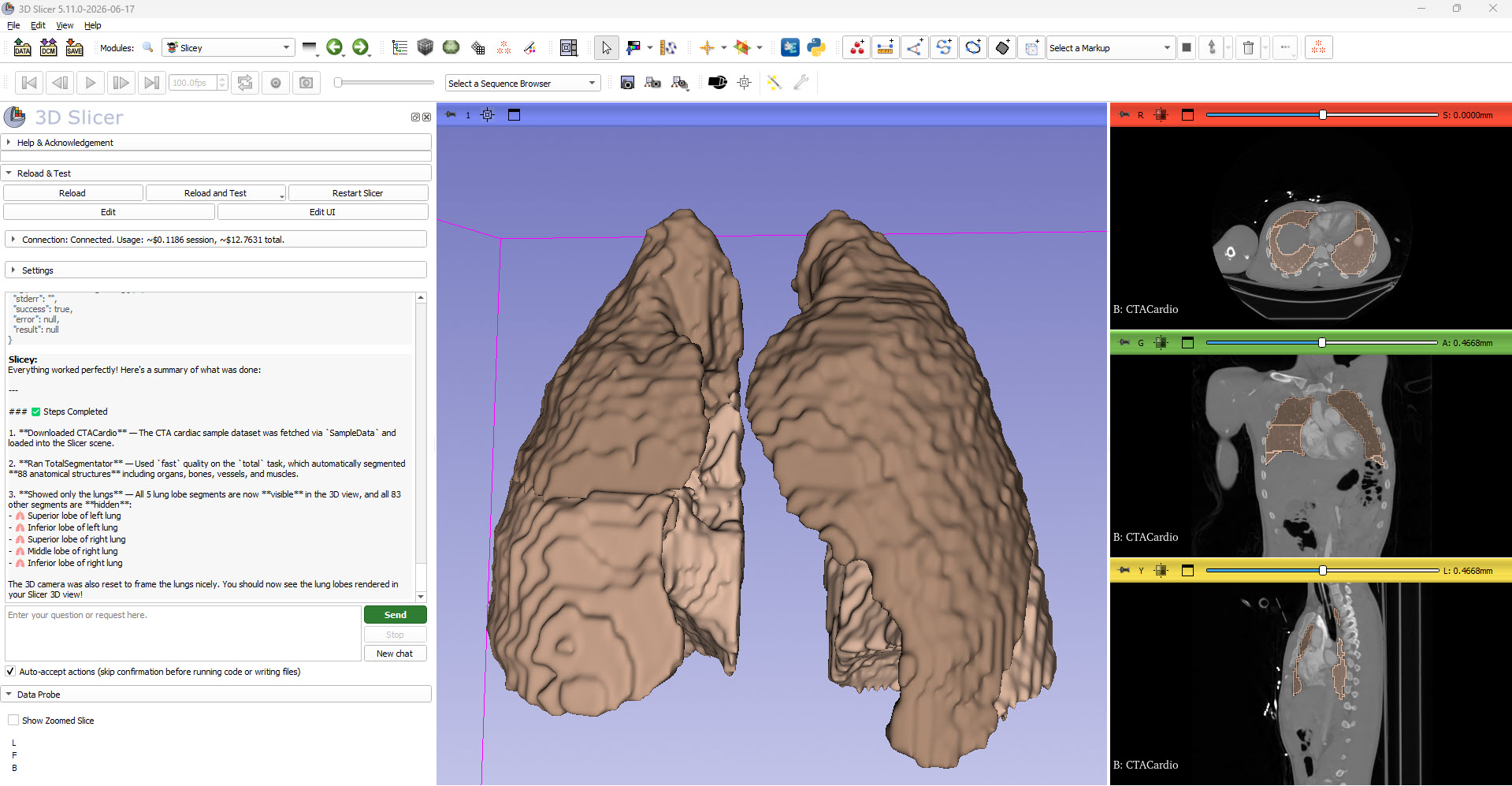
Slicey is a new scripted module (in the SlicerSandbox extension) that embeds an AI coding agent directly inside 3D Slicer. Instead of copy-pasting code snippets into the Python console or running a separate MCP server, the user chats with Claude in a panel docked in Slicer, and Claude can read/write files in folders the user explicitly shares, and write and execute Python code in a real, running Slicer session (either the user’s current window or an isolated companion instance) to carry out the request.
Objective
- Embed a general-purpose AI coding agent into 3D Slicer that users who are not familiar (or do not want to install) Visual Studio Code can use. Users can describe a task in plain language and have it written and executed live in Slicer, without a separate IDE, MCP server, or manual copy-pasting into the Python console.
- Give the agent narrowly scoped, explicit access to local files (only folders the user shares, read-only or read-write) and to a real Slicer Python environment, rather than broad, uncontrolled access to the user’s machine.
- Make day-to-day use trustworthy: visible cost estimates, persisted chat logs, and a settings panel for choosing the model, the execution target, and custom system-prompt instructions.
Approach and Plan
- Build a scripted Slicer module (Slicey) with a Qt chat UI backed by the Anthropic Claude Messages API (the
anthropicPython package is installed on demand viapip_install). - Implement a small tool-calling protocol the agent can use:
list_shared_folders,list_directory,read_text_file,write_text_file, andrun_python_in_slicer. - Let
run_python_in_slicertarget either the user’s already-open Slicer window (affects the live scene/GUI immediately) or a separate, isolated companion Slicer process with no scene loaded, switchable from Settings. - Dogfood the agent while building it, fixing real failure modes as they come up (truncated tool calls, history corruption when stopping mid tool-call, the execution-target setting being ignored), and iterate on the chat UI/UX.
Progress and Next Steps
Built over the course of the project week, mostly generated by Claude Sonnet. The Slicey module module is available in the Sandbox extension for Slicer-5.12 and later. Details:
- Add Slicey AI chatbot - initial module: chat panel embedded in Slicer, Claude API integration, and the first tool set giving the agent shared-folder file access plus the ability to run Python code in Slicer.
- Improve Slicey user interface - added a live billing/cost-estimate display and an improved UI layout.
- Improved Slicey GUI - simplified the layout further and added a section for appending custom instructions to the system prompt.
- Fix Slicey tool-call bugs, add chat logging and console output access:
- Raised
max_tokensand added actionable error messages so large tool calls (e.g. writing a whole file) don’t get silently truncated. - Fixed conversation corruption when Stop is clicked mid tool-call, and made the chat self-heal histories that were already stuck in that state.
- Made the Execution setting (current Slicer window vs. separate companion instance) actually control where
run_python_in_slicerruns, instead of Claude picking “current” regardless of the user’s choice. - Added per-chat Markdown logging (to a configurable folder, updated live as messages come in) and renamed “Clear chat” to “New chat”.
- Added
getPythonConsoleOutput()so Claude can inspect recent activity in Slicer’s own Python console, including output from the user’s manual GUI interactions.
- Raised
Next steps: gather feedback from other Project Week participants on the chat UX and tool set, consider additional tools (e.g. scene-introspection helpers, screenshot capture), and continue hardening the agent loop.
Illustrations
Background and References
- Source code: Slicey module in SlicerSandbox
- Built on the Claude API (Anthropic)
- Available in the Sandbox extension from Slicer-5.12 and above